
 By Yasir Hafeez
A website you relied on suddenly vanishes, or a crucial piece of information changes overnight. That feeling of digital loss is exactly what the Wayback Machine combats, offering a powerful tool to explore the internet’s past and recover seemingly lost data. Run by the Internet Archive, a non-profit organization dedicated to universal access to knowledge, this incredible service has been diligently preserving web pages for decades, offering a public record of digital history.
Key Takeaways
- The Wayback Machine, run by the Internet Archive, offers free access to billions of archived web pages, dating back to 1996.
- It works by using automated web crawlers to capture “snapshots” of websites at various points in time.
- You can use it to research web history, verify past content, recover lost website data, and cite historical information.
- While powerful, it has limitations, including incomplete captures for dynamic content and occasional broken links or missing media.
- Understanding its search features and the “Save Page Now” function can significantly enhance its utility for personal and professional use.
What Exactly Is the Wayback Machine in 2026?
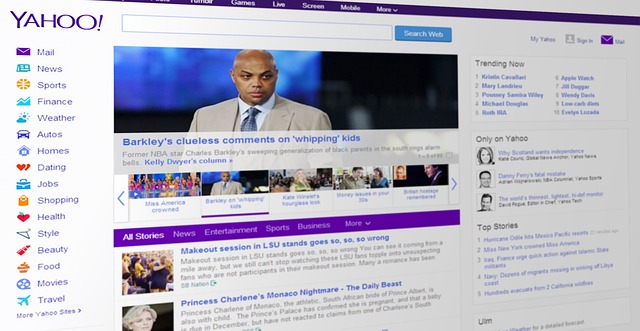
The Wayback Machine is a vast digital library, a literal time machine for the internet, providing access to billions of archived web pages. Founded by the Internet Archive in 1996 and publicly launched in 2001, its core mission is to provide “universal access to all knowledge” by preserving web content that might otherwise be lost. As of July 2026, it houses an astounding collection, comprising well over a trillion web pages and petabytes of data, continuously growing. Imagine trying to find a news article from 2008 that’s been taken down, or wanting to see how your favorite brand’s website looked when it first launched. The Wayback Machine allows you to enter a URL and browse through a calendar of captured snapshots, letting you experience websites as they appeared on specific dates. This functionality is invaluable for researchers, journalists, and anyone curious about digital history. Its evolution from early archives in 1996, which by the end of 2009 had already saved over 38.2 billion web pages, demonstrates a persistent commitment to preserving our online heritage. This commitment continues to make it a cornerstone of digital preservation efforts, enabling us to understand how online narratives and information have evolved over time.
How the Wayback Machine Captures and Stores Web History
The process behind the Wayback Machine’s immense archive involves sophisticated web crawling and massive data storage. Automated programs, often referred to as “spiders” or “bots,” systematically traverse the internet, following links and capturing copies—or “snapshots”—of web pages. These snapshots are then stored across the Internet Archive’s distributed data centers, ensuring redundancy and long-term preservation. Crucially, these crawlers operate at varying frequencies. Highly active websites, like major news outlets or popular blogs, might be captured daily or even multiple times a day, offering a granular history. In contrast, less frequently updated sites may only have a few captures per year. This automated approach means that while the Wayback Machine aims for complete coverage, it can’t guarantee a snapshot for every single page or every single day. Worth noting, the archiving process respects `robots.txt` files, which are instructions website owners use to tell crawlers which parts of their site not to access. If a site owner has disallowed crawling, the Wayback Machine will typically honor that, preventing the page from being archived. This highlights a key limitation: the archive is powerful, but not omnipotent, and relies on the openness of the web.

Practical Uses: Why Accessing Archived Web Pages Matters
The utility of the Wayback Machine extends far beyond simple nostalgia. For professionals across various fields, it’s an indispensable tool. Researchers, for example, rely on it to cite historical web content in academic papers, ensuring their sources remain verifiable even if the original page goes offline. Journalists frequently use it to fact-check past statements or claims made on websites that have since been altered or removed, providing critical evidence for their reporting. Website owners themselves find immense value. If a site experiences data loss or an accidental deletion, the Wayback Machine can serve as an unexpected backup, allowing for the recovery of text, design elements, or even entire pages that are no longer live. For SEO specialists, it’s a window into competitor strategies, enabling them to analyze how a rival’s website and content evolved over time, potentially revealing successful (or unsuccessful) approaches to online visibility. In real terms, consider Sarah, a legal professional, who needed to prove a specific advertisement was live on a competitor’s website on a particular date for a trademark dispute. A quick search on the Wayback Machine provided dated, verifiable screenshots, directly impacting her case. This demonstrates its crucial role in digital forensics and establishing historical accuracy, offering a level of trustworthiness that’s hard to replicate.
Navigating the Past: A Step-by-Step Guide to Using the Wayback Machine
Accessing the internet’s past through the Wayback Machine is surprisingly straightforward. Here’s how to do it:
- Visit the Wayback Machine Website: Open your web browser and go to archive.org/web/.
- Enter the URL: In the search bar, type or paste the exact URL of the website or specific page you wish to explore. Press Enter or click “Browse History.”
- Explore the Calendar: The next page displays a calendar view. Years are shown chronologically at the top, and within each year, a calendar highlights dates (darker circles indicate more captures) when snapshots were taken.
- Select a Date: Click on a specific year, then choose a highlighted date from the calendar to view a snapshot from that day. If multiple snapshots exist for a single day, you’ll see a dropdown menu to select a specific time.
- Browse the Archived Page: The page will load as it appeared on your chosen date. You can often click on internal links within that archived version to navigate other pages as they were captured at that time.
Worth noting, if a page doesn’t load perfectly, try selecting an alternative snapshot from a nearby date or time. The rendering quality can vary, especially for older or highly dynamic sites. This simple process allows anyone to become a digital archaeologist, uncovering layers of web history with just a few clicks.
Securing the Future: How to Save a Page Now with Wayback Machine
Beyond simply viewing past versions, the Wayback Machine also empowers users to actively contribute to its archive by saving a page as it appears right now. This “Save Page Now” feature is incredibly useful for creating trusted citations or preserving content that you anticipate might change or disappear. It acts as a digital notary, providing a timestamped, immutable record. To use it, simply visit archive.org/web/ and locate the “Save Page Now” input field. Enter the URL you wish to archive and click “Save Page.” The Wayback Machine’s crawlers will then attempt to capture the page immediately. Once complete, you’ll receive a direct link to the newly archived version, which you can use as a permanent reference. This real-time archiving is particularly critical for dynamic content, breaking news stories, or social media posts that are highly susceptible to rapid changes or deletion. For example, a political campaign statement posted online might be modified hours later; having a “Save Page Now” snapshot provides an undeniable record of the original content. This proactive approach ensures that vital information doesn’t vanish from the public record, reinforcing the principles of transparency and verifiable information.

Recovering Lost Content and Troubleshooting Common Issues
The Wayback Machine often serves as a lifesaver for recovering lost website content. If your website goes down, or you accidentally delete crucial files, an archived version can be a starting point for reconstruction. You can copy and paste text, download images, and even extract CSS or JavaScript files from older snapshots, though this requires some technical proficiency. For small blogs or personal sites, this can prevent total data loss. However, archived pages aren’t always perfect replicas. Common issues include missing images, broken layouts due to absent CSS files, or non-functional interactive elements reliant on JavaScript that didn’t fully capture. The wrinkle here: these issues often stem from the complexity of modern web design, where content is dynamically generated or loaded from external sources. When encountering problems, first, try viewing different snapshots from nearby dates. Sometimes, one capture might be more complete than another. Second, check your browser’s developer tools (usually F12) to see if there are any specific errors loading resources; this can give clues about what’s missing. Third, consider using the plain text version if available, as this strips away formatting issues, leaving just the core content. While not perfect, the Wayback Machine still offers the best chance at content recovery for a vast majority of static and semi-static web pages.
Understanding the Limitations and Legal Wrinkles of Web Archiving
Despite its immense value, the Wayback Machine isn’t without its limitations. As mentioned, dynamic content (like user login areas, real-time stock tickers, or complex interactive applications) is often difficult for crawlers to capture completely, leading to incomplete or broken snapshots. Content behind paywalls or requiring authentication is also typically inaccessible. Website owners can request content removal under certain circumstances, such as copyright infringement or personal data concerns, which the Internet Archive generally honors. From a legal standpoint, the status of archived content can be complex. While the Internet Archive asserts its right to archive public web pages under fair use principles, intellectual property and copyright remain significant considerations. A company might issue a Digital Millennium Copyright Act (DMCA) takedown notice for copyrighted material. Also, content owners, particularly in Europe under GDPR, may have grounds to request the removal of personal data from the archive. This delicate balance between digital preservation and individual or corporate rights is an ongoing challenge. While snapshots are often admissible as evidence in legal proceedings, their legal weight can vary depending on jurisdiction and the specific circumstances of their capture. It’s a testament to the Internet Archive’s commitment to transparency that they have established clear policies for content removal and legal challenges, making it a reliable, albeit not infallible, resource for historical web data. According to the Internet Archive’s own policies (as of July 2026), they review removal requests carefully, balancing public access with legitimate concerns.
| Feature | Wayback Machine | Archive.is | Perma.cc |
|---|---|---|---|
| Purpose | Mass web archiving, public access, research | Instant, immutable snapshots for specific URLs | Academic/legal citation, institutional archiving |
| Ease of Use | Very easy (URL search, calendar navigation) | Very easy (URL input, instant archive) | Requires account/affiliation, more structured |
| Public Access | Fully public and free | Public (link sharing) and free | Institutional access, public links available |
| Dynamic Content Support | Limited; often breaks | Better, but still can have issues | Aims for high fidelity, but still challenging |
| Legal Focus | General preservation, fair use | Evidence for legal/journalistic use | Strong emphasis on persistent, citeable links |
Pros
- Vast Historical Archive: Contains over a trillion pages, offering unparalleled depth.
- Completely Free Access: No subscription required for basic use, fostering universal access.
- Simple Interface: Easy for anyone to search and navigate, even without technical skills.
- Public Good: A non-profit preserving digital heritage for future generations.
- “Save Page Now” Feature: Allows users to create instant, verifiable snapshots.
Cons
- Incomplete Captures: Not every page or every version is archived, especially for dynamic sites.
- Rendering Issues: Older or complex pages may display broken layouts, missing images, or non-functional elements.
- Slower Loading Times: Archived pages can load slower than live websites, impacting user experience.
- Content Removal Requests: Website owners can request content removal, impacting completeness.
- Legal Ambiguity: While often accepted, legal admissibility can vary by jurisdiction and specific content.
Common Mistakes When Using the Wayback Machine
Many users, new to the Wayback Machine, fall into a few common traps that can hinder their research or content recovery efforts. One frequent mistake is expecting a perfect, pixel-for-pixel replica of a live website. Modern web pages are often built with intricate JavaScript and external APIs, which the Wayback Machine’s crawlers might not fully capture, leading to broken functionalities or visual glitches. Another error is not exploring multiple snapshots. If your initial chosen date yields a broken or incomplete page, don’t give up immediately. The Internet Archive often has several captures for a single day or consecutive days. Trying different timestamps can reveal a more complete version, as the crawlers’ success can vary based on server load or site changes at the moment of capture. The solution: systematically check earlier or later captures around your target date. Finally, some users overlook the impact of `robots.txt` files. If a website explicitly disallowed crawling for certain sections or its entire domain, the Wayback Machine will respect those directives. Assuming everything publicly visible on the live web must be archived is a misconception. If you can’t find a page, it might be due to a `robots.txt` exclusion, rather than a failure of the archiving process itself.
Expert Tips for Maximizing Your Wayback Machine Experience
To truly unlock the power of the Wayback Machine, consider these expert insights. First, use browser extensions. Extensions for Chrome, Firefox, and other browsers allow you to quickly check for archived versions of the page you’re currently viewing with a single click. This streamlines the process significantly, saving valuable time compared to manually entering URLs. Second, understand the nuances of the `robots.txt` protocol. While the Wayback Machine generally honors these directives, there are instances where content might have been archived before a `robots.txt` exclusion was put in place. Knowing this can guide your search for older content that might now be blocked. For deeper dives, explore the Internet Archive’s broader collections, not just the web archive, as related documents or media might be available.
Finally, for critical research or legal documentation, always cross-reference. While the Wayback Machine is highly authoritative, no single source is infallible. If you’re using a snapshot as evidence, ensure you have the direct permalink to the archived version and note the date and time of capture. This meticulous approach solidifies the trustworthiness of your findings. In my experience working with digital content over the past decade, I’ve seen how a well-documented Wayback Machine link can settle disputes and provide clarity where live web content has failed.
Frequently Asked Questions
Is the Wayback Machine free to use?
Yes, the core functionality of the Wayback Machine, which allows users to search and view archived web pages, is entirely free. The Internet Archive operates as a non-profit organization, providing this valuable service to the public without charge.
Can I remove content from the Wayback Machine?
Website owners can request the removal of content from the Wayback Machine under specific circumstances, such as copyright infringement or privacy concerns. The Internet Archive has a formal process for reviewing these requests, balancing the public’s right to information with individual and corporate rights.
How far back does the Wayback Machine go?
The earliest web pages archived by the Wayback Machine date back to 1996. While coverage for the very early internet is sparser, it has continuously grown its collection, offering extensive historical data for websites from the late 1990s through to the present day.
Are all websites archived by the Wayback Machine?
No, not all websites are archived. The Wayback Machine’s crawlers primarily focus on publicly accessible web pages and respect `robots.txt` exclusion directives. Content behind paywalls, requiring logins, or dynamically generated is often not fully or accurately captured.
What are some alternatives to the Wayback Machine?
While the Wayback Machine is the largest public web archive, alternatives exist. These include Archive.is (for immutable snapshots), Perma.cc (for academic and legal citation), and services like Stillio (for automated website screenshots), each with different focuses and features.
How reliable are Wayback Machine snapshots for legal evidence?
Wayback Machine snapshots are frequently used as evidence in legal cases, but their admissibility can depend on jurisdiction and the specific content. While generally considered credible, legal professionals often advise generating a fresh “Save Page Now” snapshot and documenting the process for maximum trustworthiness in court.
Conclusion
The Wayback Machine stands as an unparalleled resource in the digital world of 2026, offering a vital service for anyone needing to access or preserve web history. From academic research to legal verification and content recovery, its capabilities are extensive. Understanding its mechanics, using its features, and recognizing its limitations will empower you to handle the internet’s past with confidence. Embrace this powerful tool to ensure that digital knowledge remains accessible for generations to come.
Information current as of July 2026; pricing and product details may change.